Why Your Standing Desk Needs an Anti-Fatigue Ergonomic Desk Stool
An anti-fatigue ergonomic desk stool is one of the fastest ways to reduce back pain, leg fatigue, and poor posture at a standing desk. Here are the top options to consider:
| Stool | Best For | Height Range | Weight Capacity |
|---|---|---|---|
| LeanRite Elite | Back pain relief, sit-stand-lean | 22.5″ – 46.2″ | 270 lbs |
| VIVO Posture Chair | Budget pick with anti-fatigue mat | 24″ – 46.3″ | 275 lbs |
| Breck Stool | Sustainability + durability | 20.9″ – 28.5″ | 325 lbs |
| Autonomous ErgoStool | Everyday active sitting | Not listed | Not listed |
| Leitz Ergo Active Stool | Wobble + core engagement | 47 – 60 cm | 242 lbs |
| Haworth Tilt Stool | Premium perching | 23.5″ – 34.75″ | Not listed |
Standing all day sounds healthy — until your feet ache, your lower back tightens, and your energy crashes by 2 p.m.
Sitting in a traditional chair isn’t much better. Static seating shuts down circulation, weakens your core, and locks your spine in one position for hours.
There’s a smarter middle ground.
An anti-fatigue ergonomic desk stool lets you perch, lean, and shift between positions throughout the day. It keeps your body moving — even when you’re technically “sitting.” One lecturer who switched to this style of seating reported that soreness that had built up over years of standing to teach simply vanished within a week of use.
These stools aren’t just a comfort upgrade. They’re a productivity tool. And with options ranging from budget-friendly to premium doctor-recommended designs, there’s something for every workspace and body type.
Below, we break down the best anti-fatigue ergonomic desk stools available right now — so you can stop the slump and start working better.
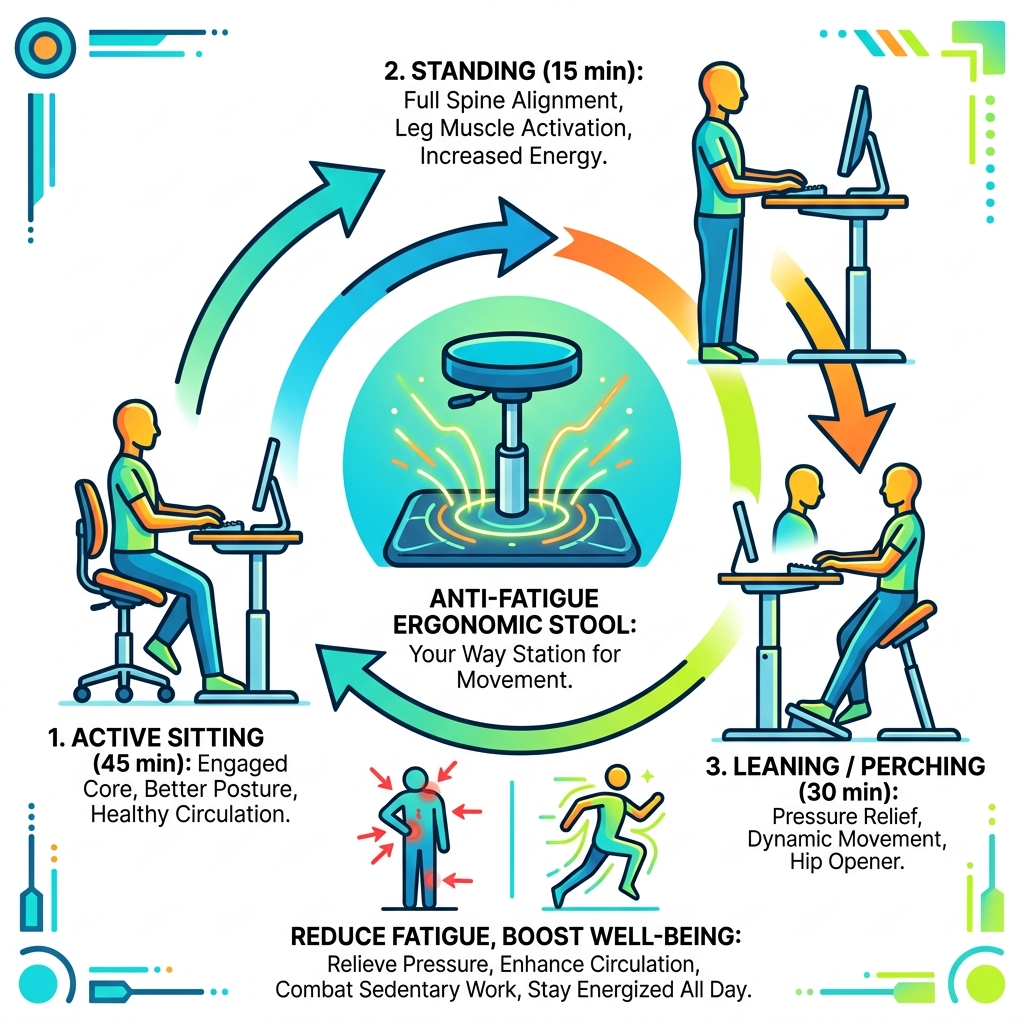
Understanding the Anti-Fatigue Ergonomic Desk Stool
When we talk about an anti-fatigue ergonomic desk stool, we aren’t just talking about a tall chair. These are specialized tools designed to act as a “way station” between sitting and standing. Unlike a traditional office chair that encourages you to park your weight and stay still, an ergonomic stool invites movement.
Traditional chairs often lead to “static loading,” where your muscles stay in a fixed position, restricting blood flow. In contrast, ergonomic stools promote “active seating.” This means the stool responds to your micro-movements, tilting or wobbling slightly so your core muscles stay engaged. This constant, subtle activity keeps your circulation pumping and prevents the dreaded afternoon energy slump.

One of the most popular ways to use these stools is through a “perching” posture. Perching is a hybrid position where your feet remain on the floor (or an integrated mat), but your pelvis is supported at a higher angle than a standard seat. This opens up the hip angle, which naturally aligns the spine and reduces the pressure on your lower back discs.
If you are concerned about the materials used in your office furniture, you might also want to explore non-toxic-ergonomic-desk-stools/ to ensure your movement-rich experience is also a chemically safe one.
Traditional Office Chairs vs. Anti-Fatigue Stools
| Feature | Traditional Office Chair | Anti-Fatigue Ergonomic Stool |
|---|---|---|
| Primary Posture | 90-degree sitting | Perching, leaning, or active sitting |
| Core Engagement | Low (backrest does the work) | High (requires core stability) |
| Mobility | Limited to rolling | 360-degree tilt and swivel |
| Space Footprint | Large | Minimal / Slim profile |
| Health Focus | Passive support | Circulation and muscle activation |
The Science of Perching and Leaning
The magic of these stools lies in the “neutral posture.” When we stand, we often lock our knees or lean on one hip, which creates fatigue. When we sit, we slouch. Perching—supported by tools like the LeanRite Standing Desk Chair for Back Pain Prevention – Ergo Impact—places the body in a position that reduces spinal load.
Orthopedic experts often recommend this because it mimics the natural curve of the spine. By leaning against a stool rather than sitting fully, you take about 60-70% of the weight off your feet while maintaining the benefits of standing. This neutral position is proven to reduce pressure on the lower back, making it a favorite for those dealing with chronic lumbar pain.
Safety Certifications and Durability
We believe that a stool is only as good as its build quality. When shopping, look for industry-standard certifications. BIFMA (Business and Institutional Furniture Manufacturers Association) standards ensure the stool can handle the rigors of a professional office. UL Certification and TÜV/GS marks are German and international indicators of strict safety and quality testing.
For those focusing on air quality and health, prioritizing GREENGUARD Gold certified products is essential. This ensures the stool doesn’t emit harmful volatile organic compounds (VOCs) into your home or office. You can find more details on healthy seating in our guide to non-toxic-ergonomic-office-chairs/.
Key Features and Active Sitting Mechanisms
What actually makes a stool “ergonomic”? It’s the combination of adjustability and dynamic movement. Most high-quality stools feature a pneumatic spring—a gas-lift cylinder that allows for smooth height transitions. This is vital because the ideal height for perching is much higher than the height for traditional sitting.
Essential Stool Adjustments to Look For:
- Height Range: Look for at least a 10-inch adjustment range to accommodate both sitting and perching.
- Weight Capacity: Ensure the stool supports your weight; models like the Breck Stool can handle up to 325 lbs.
- Tilt Tension: Some stools allow you to adjust how much “wobble” or resistance the base provides.
- Seat Angle: Higher-end models allow the seat to tilt forward (often up to 15° or 45°) to better support a leaning posture.
Integrated Mats and Foot Relief in an Anti-Fatigue Ergonomic Desk Stool
One of the most innovative features in the market today is the integration of an anti-fatigue mat directly into the stool’s base. For example, the Posture Chair with Anti-Fatigue Mat – VIVO – desk solutions, screen mounting, and more features a thick, padded foam mat that provides immediate relief for aching feet.
These mats work by encouraging subtle muscle contractions in the calves and feet, which improves blood flow back to the heart. This reduces the “heavy leg” feeling that many standing desk users experience. Some models even feature a removable mat for easy cleaning, revealing a padded grip surface underneath that prevents the stool from sliding while you lean.
Dynamic Spine Motion and Wobble Technology
Active sitting is powered by “wobble” technology. Stools like the Tilt Stool – Haworth Store use a rounded, weighted base that allows you to tilt in any direction. This 360-degree movement is often referred to as Dynamic Spine Motion.
This technology serves a dual purpose:
- Engages the Core: You have to use your abdominal and back muscles to stay balanced, which strengthens your core over time.
- Nourishes the Spine: Movement helps the spinal discs stay hydrated by encouraging the flow of nutrients through the vertebrae.
To keep things comfortable, look for “Dual Density Foam” (DDF). This involves a firm inner core to support your pelvic bones and a softer outer layer to prevent pressure points on your thighs—a feature that sets premium stools apart from cheap alternatives.
Selecting the Right Stool for Your Workspace
Choosing the right anti-fatigue ergonomic desk stool depends largely on your environment. In a collaborative office, you might want something lightweight and mobile with wheels. For a dedicated home office, a more stable, heavy-duty leaning stool might be the better investment.
Price ranges vary significantly. You can find entry-level wobble stools for around $100–$200, while premium, doctor-recommended models can exceed $1,000. While the price jump is steep, premium models offer longer warranties (often up to 12 years), better safety certifications, and more advanced ergonomic research. Check out our list of best-eco-friendly-desk-chairs-for-posture/ for options that balance price and sustainability.
How to Choose an Anti-Fatigue Ergonomic Desk Stool for Your Height
Height is the most critical factor. If a stool doesn’t go high enough, you can’t “perch” effectively; if it’s too high, you can’t sit.
- Users 5’0″ to 6’4″: Most versatile stools, like the Autonomous ErgoStool – Ergonomic Stool for Standing Desks in Canada, are designed for this range.
- Treadmill Desks: Look for “treadtop” stools that are specifically designed with a higher base to clear the treadmill deck.
- Drafting Desks: Ensure the stool has a foot ring or a built-in footrest to prevent your legs from dangling, which can cut off circulation.
Sustainability and Non-Toxic Materials
We are big fans of furniture that is as good for the planet as it is for your back. The Breck Stool, for instance, is made from over 50% recycled content and is 94% recyclable at the end of its life.
When evaluating materials, look for:
- OEKO-TEX 100 Textiles: These are tested for harmful substances and are safe for skin contact.
- Low Carbon Footprint: Some manufacturers now track the CO2e (carbon dioxide equivalent) of their products.
- Recycled Wood: For a more aesthetic look, you can find affordable-recycled-wood-office-chairs/ that offer a natural feel while remaining eco-friendly.
Frequently Asked Questions about Ergonomic Stools
How do I properly adjust my stool for maximum comfort?
To get the most out of your anti-fatigue ergonomic desk stool, follow these steps:
- The 90-Degree Rule: When sitting fully, your knees should form a 90-degree angle with your feet flat on the floor or the stool’s footrest.
- The Perch Position: Raise the stool to about hip height. Lean back so the seat supports your pelvis, but keep your feet firmly on the floor or the anti-fatigue mat.
- Transition Often: Don’t stay in one position for more than 30–60 minutes. Switch from standing to perching to sitting to keep your muscles engaged.
What are common user complaints and how can I avoid them?
While these stools are game-changers, they aren’t perfect for everyone.
- Stability Issues: Some users feel “tipsy” on wobble stools. If you’re worried about balance, choose a stool with a wider base or a “weighted” bottom that naturally returns to center.
- Cushion Firmness: Many ergonomic stools have firmer seats than traditional chairs. This is intentional to prevent you from “sinking” and losing posture, but it can take 1–2 weeks for your body to adjust.
- Slipping: If you wear socks, you might slip on some anti-fatigue mats. We recommend wearing shoes or using a stool with a high-grip surface.
Are these stools suitable for medical or classroom settings?
Absolutely. Because they have a slim profile and promote movement, they are excellent for:
- Medical Professionals: Saddle-style stools allow doctors and dentists to get close to patients while maintaining a healthy spine.
- Classrooms: Wobble stools are fantastic for students who need to “fidget” to focus, providing a safe outlet for energy.
- Small Offices: Their compact design means they can often be tucked under a desk when not in use, saving valuable floor space.
Conclusion
At FinanceInvestX, we believe that your workspace should be an investment in your long-term health. Switching to an anti-fatigue ergonomic desk stool isn’t just about buying a new piece of furniture; it’s about committing to a more active, energetic workday. By reducing the physical strain on your body, you free up mental energy to focus on what really matters—your work and your productivity.
Whether you choose a budget-friendly wobble stool or a premium leaning chair with an integrated mat, the benefits of active sitting are undeniable. Stop the slump, engage your core, and give your feet the relief they deserve.
Ready to upgrade the rest of your office? Explore More info about ergonomic furniture to find the perfect non-toxic and eco-friendly solutions for your workstation.