Why Your Healthy Desk Setup Could Be the Most Important Workplace Decision You Make
A healthy desk setup means arranging your chair, desk, monitor, and peripherals so your body stays in a neutral, supported position throughout the workday.
Here’s the quick version of what a healthy desk setup looks like:
- Chair: Feet flat on the floor, knees at 90°, lumbar support in place
- Desk height: Elbows bent at roughly 90°, forearms parallel to the floor
- Monitor: Top of screen at or just below eye level, 20-40 inches away
- Keyboard and mouse: Wrists straight, upper arms close to your sides
- Movement: Stand or stretch for 1-2 minutes every 30 minutes
Now, here’s why it matters.
If you work 40 hours a week, you’ll clock over 2,000 hours a year at your desk. Over three years, that’s more than 6,000 hours in the same chair, staring at the same screen. Every small misalignment adds up over that time.
Poor posture isn’t just a comfort issue. Slouching can reduce your lung capacity by up to 30%, leaving you feeling tired and foggy by mid-afternoon. And for every inch your head drifts forward from a screen that’s too low, your neck muscles work twice as hard just to hold it up.
The good news? You don’t need an expensive overhaul. Research shows that proper ergonomic adjustments can reduce musculoskeletal problems by up to 60% and improve productivity by as much as 20%. Even small changes — raising your monitor, adjusting your chair height, adding a lumbar cushion — can make a real difference in just a few weeks.
This guide walks you through every part of your setup, from choosing the right chair to managing cables, so you can work comfortably and protect your health for the long term.
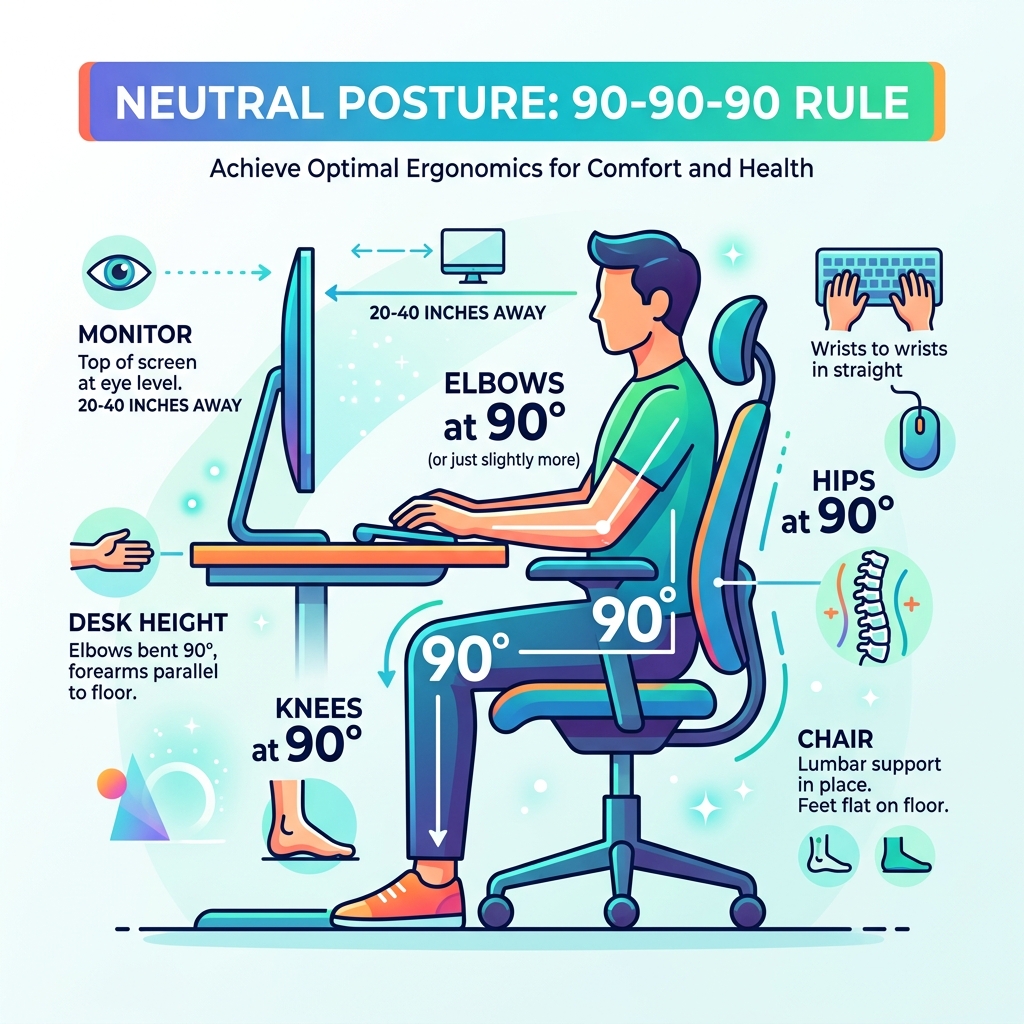
The Core Components of a Healthy Desk Setup
Building a healthy desk setup isn’t about buying the most expensive gear; it’s about “human factors engineering.” According to scientific research on office ergonomics, the goal is to fit the workstation to the person, not the other way around.
When we ignore these principles, we fall into “static loading,” where our muscles stay tense for hours. This leads to reduced blood flow and the dreaded “3 PM slump.” By maintaining a neutral posture—where your joints are naturally aligned—you reduce stress on your muscles and tendons. This alignment actually helps your internal organs function better; for instance, sitting upright prevents the compression of your diaphragm, maintaining that vital lung capacity we mentioned earlier.
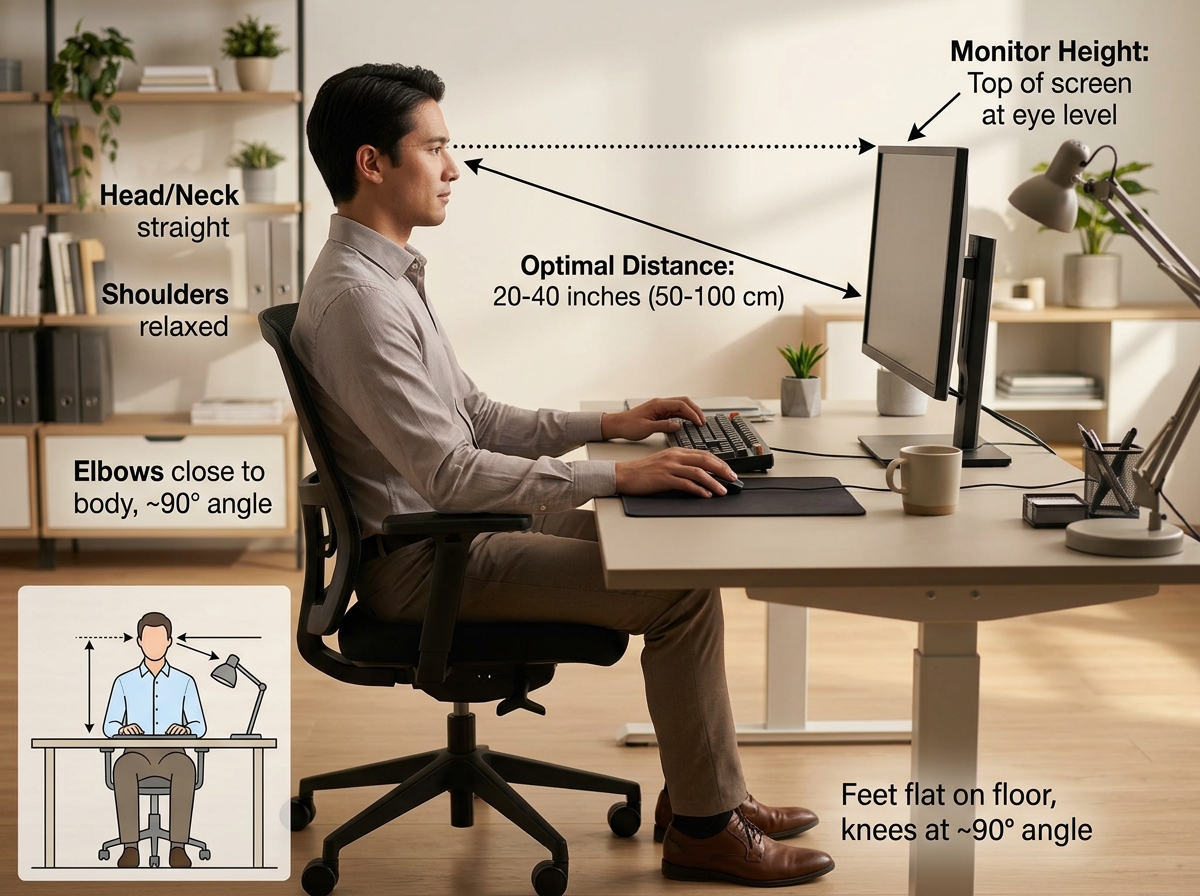
Choosing the Right Chair and Desk
The foundation of your workspace is the chair. We recommend looking for a chair that supports the natural “S” curve of your spine. Key features should include adjustable lumbar support, seat depth (you should have a 2-4 finger gap between the seat edge and the back of your knees), and armrests that allow your shoulders to stay relaxed. If you are looking for sustainability alongside support, check out these best eco friendly desk chairs for posture to ensure your seat is as kind to the planet as it is to your lower back.
Your desk should complement your chair. A desk that is too high forces you to shrug your shoulders, while one that is too low leads to slouching. For those who want a natural, non-toxic aesthetic, adjustable bamboo desks for home office use offer the perfect blend of height customization and sustainable materials.
Perfecting Monitor and Peripheral Placement
Your monitor is the focal point of your day. To avoid neck strain, the top of your screen should sit at or slightly below eye level. If you find yourself leaning forward, your monitor is likely too far away. Aim for a distance of 20 to 40 inches (about an arm’s length).
For your peripherals, keep your keyboard and mouse on the same surface. Your wrists should remain straight—never tilted up or down. To protect your wrists from “contact stress” caused by hard desk edges, we suggest using non toxic desk mats and pads to provide a cushioned, safe surface for your forearms.
Mastering the Sit-Stand Transition
The “sitting disease” is a real concern in the finance and investment world, but standing all day isn’t the cure-all either. CDC research on sit-stand desks found that users who reduced their sitting time by just over an hour a day reported a 54% reduction in upper back and neck pain.
The secret is the transition. We suggest a sitting-to-standing ratio of 1:1 or 2:1. This means for every hour you sit, stand for 30 to 60 minutes. To make this transition seamless, consider the best eco friendly standing desks for home office which allow you to change heights at the press of a button.
Optimizing Your Healthy Desk Setup for Standing
When you stand, your ergonomic rules change slightly. Your elbows should still maintain a 90-degree angle to the keyboard, and your weight should be distributed evenly across both feet. Avoid “locking” your knees, as this can impede circulation. To make standing more comfortable, we highly recommend using sit stand and smile with these anti fatigue desk stools or a high-quality mat to reduce the impact on your joints.
Active Seating and Movement Breaks
Static posture is the enemy, even if that posture is “perfect.” We advocate for “active seating,” which encourages micro-movements while you work. If you find yourself slouching into a standard task chair, you might want to stop the slump with these ergonomic desk stools. These stools engage your core and keep your spine moving.
Additionally, follow the 20-20-20 rule for eye health: every 20 minutes, look at something 20 feet away for 20 seconds. This simple habit, combined with a quick 2-minute walk every hour, keeps your blood circulating and your brain sharp.
Environmental Factors and Minimalism
A healthy desk setup extends beyond furniture; it’s about the atmosphere. Visual clutter acts as a constant, subconscious stress trigger. By adopting a minimalist approach, you free up “cognitive bandwidth” for your actual work.
Cable management is often the biggest hurdle to a clean desk. Tangled wires aren’t just ugly; they collect dust and make cleaning difficult. Using eco friendly desks with cable management features like built-in trays or grommets can transform a chaotic workspace into a zen-like environment.
Personalizing Your Healthy Desk Setup
Minimalism doesn’t mean a cold, empty room. We love incorporating indoor plants like Snake Plants or Pothos, which improve air quality and provide a “biophilic” connection to nature. When choosing decor, prioritize non-toxic materials. Environmentally conscious workspace design focuses on using items that don’t off-gas harmful chemicals, ensuring the air you breathe during those 2,000 hours a year is clean.
Lighting and Eye Health
Poor lighting is a leading cause of headaches and “computer vision syndrome.” Whenever possible, use natural light, but position your desk perpendicular to windows to avoid glare on the screen. For evening work, screen bars or adjustable desk lamps provide indirect lighting that doesn’t bounce off your monitor. For a deeper dive into creating the perfect ambiance, read a guide to your new healthy office environment.
Adapting Ergonomics for Every Scenario
Not everyone has a sprawling corner office. Whether you’re working from a studio apartment or a busy corporate floor, you can still maintain a healthy desk setup.
| Feature | Laptop Setup | Desktop Setup |
|---|---|---|
| Screen Height | Requires a riser/stand | Adjusted via monitor arm |
| Keyboard | External keyboard is mandatory | Standard placement |
| Mouse | External vertical mouse recommended | Standard placement |
| Flexibility | High (portable) | Low (fixed) |
If you are tight on square footage, check out these minimalist desk setups for small spaces to see how to maximize ergonomics in a tiny footprint.
Solving the Laptop Nightmare
Laptops are “ergonomic nightmares” because the keyboard and screen are joined. If the keyboard is at the right height for your hands, the screen is too low for your eyes—and vice versa. To fix this, you must separate them. Use a laptop riser to bring the screen to eye level and connect an external keyboard and mouse. Pairing this with non toxic ergonomic office chairs ensures that your mobile workstation is just as supportive as a permanent one.
Budget-Friendly Ergonomic Fixes
You don’t need a massive budget to start your ergonomic journey.
- Monitor too low? Use a stack of sturdy hardcover books.
- No lumbar support? A rolled-up towel placed in the small of your back works wonders.
- Feet dangling? Use a sturdy box or a ream of paper as a makeshift footrest.
Even if you’re starting small, investing in quality pieces over time is key. Handmade sustainable desks for professionals are a great long-term investment that provides durability and health benefits for years to come.
Frequently Asked Questions about Healthy Desk Setups
How often should I switch between sitting and standing?
We recommend switching every 30 to 60 minutes. The goal isn’t to stand for four hours straight—which can cause its own issues like varicose veins or foot pain—but to avoid staying in any single position for too long. Listen to your body; if you feel your weight shifting or your back stiffening, it’s time to change.
What is the best monitor height for bifocal wearers?
If you wear bifocals, you likely tilt your head back to see through the lower part of your lenses. This causes significant neck strain. To fix this, lower your monitor an additional 1 to 2 inches (2-5 cm) below the standard eye-level recommendation. This allows you to view the screen comfortably through your lenses without tilting your chin up.
How do I fix forward head posture at my desk?
Forward head posture, often called “Tech Neck,” happens when your screen is too low or too far away. First, raise your monitor so the top third is at eye level. Second, perform “chin tucks” throughout the day to reset your neck muscles. Finally, ensure your chair’s lumbar support is pushing your lower back forward, which naturally helps stack your shoulders and head in a straight line.
Conclusion
Investing in a healthy desk setup is one of the highest-ROI decisions you can make for your career and your longevity. In the finance and investment world, we understand that small, consistent gains lead to massive long-term results—and ergonomics is no different. By spending a few minutes today adjusting your monitor or choosing a more supportive stool, you are preventing chronic pain and boosting your daily energy.
At FinanceInvestX, we believe that your workspace should be an asset, not a liability. Ready to transform your office? Explore our full range of ergonomic accessories to find the non-toxic, sustainable tools you need to work smarter and live healthier.